












Yorkshire Buzz
Advertisement
  • Home
  • News
    • All
    • Business
    • Politics
    • Science
    • World
    Crypto giant Binance attempting to recover .3bn stolen in hack linked to North Korea

    Crypto giant Binance attempting to recover $6.3bn stolen in hack linked to North Korea

    Watch: What we know about Binance’s .3bn hack

    Watch: What we know about Binance’s $6.3bn hack

    Tributes paid to ‘Mirfield’s finest’ actor Sir Patrick Stewart

    Tributes paid to ‘Mirfield’s finest’ actor Sir Patrick Stewart

    Yorkshire Water given lowest environmental rating by regulator

    Yorkshire Water given lowest environmental rating by regulator

    Tarik Muharemovic: Is Leeds United defender in the conversation for signing of the season?

    Tarik Muharemovic: Is Leeds United defender in the conversation for signing of the season?

    Microsoft profits soar days after announcing thousands of layoffs

    Microsoft profits soar days after announcing thousands of layoffs

    Trending Tags

    • Trump Inauguration
    • White House
  • Tech
    • All
    • Apps
    • Gadget
    • Mobile
    • Startup
    Google Pixel Watch 5 Sale: Its Lowest Price Yet (2026)

    Google Pixel Watch 5 Sale: Its Lowest Price Yet (2026)

    Bose’s Hottest Product Is Briefly Back in Stock

    Bose’s Hottest Product Is Briefly Back in Stock

    Google Home fixes arrive for cameras, Matter devices, and more

    Google Home fixes arrive for cameras, Matter devices, and more

    Android 17 QPR3 Beta 3 brings back app lock and fixes dozens of bugs

    Android 17 QPR3 Beta 3 brings back app lock and fixes dozens of bugs

    Google is updating smart home hardware left and right

    Google is updating smart home hardware left and right

    I Did Push-Ups With Snap’s Chunky AR Glasses

    I Did Push-Ups With Snap’s Chunky AR Glasses

    Trending Tags

    • Nintendo Switch
    • Mark Zuckerberg
  • Entertainment
    • All
    • Gaming
    • Movie
    • Music
    • Sports
    Name the character

    Name the character

    40 Years Later, Hellraiser Returns For Big New Era

    40 Years Later, Hellraiser Returns For Big New Era

    Canelo names the rematch he wants more between Terence Crawford and Dmitry Bivol

    Canelo names the rematch he wants more between Terence Crawford and Dmitry Bivol

    6 Celebrity Outfit Ideas to Recreate for Fall 2026

    6 Celebrity Outfit Ideas to Recreate for Fall 2026

    Alestorm Recording New Album – in Metal News ( Metal Underground.com )

    Alestorm Recording New Album – in Metal News ( Metal Underground.com )

    Lewis Hamilton: Ferrari driver says he ‘is built differently’ amid defiance over extending his F1 career into 2030s | F1 News

    Lewis Hamilton: Ferrari driver says he ‘is built differently’ amid defiance over extending his F1 career into 2030s | F1 News

  • Lifestyle
    • All
    • Fashion
    • Food
    • Health
    • Travel
    Gigi’s Tartan-Skirt-and-Brown-Boot Combo Is the Coolest Formula

    Gigi’s Tartan-Skirt-and-Brown-Boot Combo Is the Coolest Formula

    Bindiyan Festival in Kabayan, Benguet

    Bindiyan Festival in Kabayan, Benguet

    Maybelline Brown Mascara Shades That Suit All Eye Colours

    Maybelline Brown Mascara Shades That Suit All Eye Colours

    Stuffed Flounder

    Stuffed Flounder

    Sloppy Joe’s Recipe – Pinch of Yum

    Sloppy Joe’s Recipe – Pinch of Yum

    Sam Nivola on New Series Phony and His Directing Passions

    Sam Nivola on New Series Phony and His Directing Passions

    Trending Tags

    • Golden Globes
    • Game of Thrones
    • eSports
  • Review
    Asus Googlebook 14 Review – Trusted Reviews

    Asus Googlebook 14 Review – Trusted Reviews

    Movavi Video Editor 27 review

    Movavi Video Editor 27 review

    Paleblue Voyager C USB-C Review

    Paleblue Voyager C USB-C Review

    Resident Evil 4 for Nintendo Switch 2 review: a good, but imperfect port

    Resident Evil 4 for Nintendo Switch 2 review: a good, but imperfect port

    Asus ProArt P16 (2026, RTX Spark) Review

    Asus ProArt P16 (2026, RTX Spark) Review

    HP Color LaserJet Enterprise 4701 laser printer review

    HP Color LaserJet Enterprise 4701 laser printer review

No Result
View All Result
  • Home
  • News
    • All
    • Business
    • Politics
    • Science
    • World
    Crypto giant Binance attempting to recover .3bn stolen in hack linked to North Korea

    Crypto giant Binance attempting to recover $6.3bn stolen in hack linked to North Korea

    Watch: What we know about Binance’s .3bn hack

    Watch: What we know about Binance’s $6.3bn hack

    Tributes paid to ‘Mirfield’s finest’ actor Sir Patrick Stewart

    Tributes paid to ‘Mirfield’s finest’ actor Sir Patrick Stewart

    Yorkshire Water given lowest environmental rating by regulator

    Yorkshire Water given lowest environmental rating by regulator

    Tarik Muharemovic: Is Leeds United defender in the conversation for signing of the season?

    Tarik Muharemovic: Is Leeds United defender in the conversation for signing of the season?

    Microsoft profits soar days after announcing thousands of layoffs

    Microsoft profits soar days after announcing thousands of layoffs

    Trending Tags

    • Trump Inauguration
    • White House
  • Tech
    • All
    • Apps
    • Gadget
    • Mobile
    • Startup
    Google Pixel Watch 5 Sale: Its Lowest Price Yet (2026)

    Google Pixel Watch 5 Sale: Its Lowest Price Yet (2026)

    Bose’s Hottest Product Is Briefly Back in Stock

    Bose’s Hottest Product Is Briefly Back in Stock

    Google Home fixes arrive for cameras, Matter devices, and more

    Google Home fixes arrive for cameras, Matter devices, and more

    Android 17 QPR3 Beta 3 brings back app lock and fixes dozens of bugs

    Android 17 QPR3 Beta 3 brings back app lock and fixes dozens of bugs

    Google is updating smart home hardware left and right

    Google is updating smart home hardware left and right

    I Did Push-Ups With Snap’s Chunky AR Glasses

    I Did Push-Ups With Snap’s Chunky AR Glasses

    Trending Tags

    • Nintendo Switch
    • Mark Zuckerberg
  • Entertainment
    • All
    • Gaming
    • Movie
    • Music
    • Sports
    Name the character

    Name the character

    40 Years Later, Hellraiser Returns For Big New Era

    40 Years Later, Hellraiser Returns For Big New Era

    Canelo names the rematch he wants more between Terence Crawford and Dmitry Bivol

    Canelo names the rematch he wants more between Terence Crawford and Dmitry Bivol

    6 Celebrity Outfit Ideas to Recreate for Fall 2026

    6 Celebrity Outfit Ideas to Recreate for Fall 2026

    Alestorm Recording New Album – in Metal News ( Metal Underground.com )

    Alestorm Recording New Album – in Metal News ( Metal Underground.com )

    Lewis Hamilton: Ferrari driver says he ‘is built differently’ amid defiance over extending his F1 career into 2030s | F1 News

    Lewis Hamilton: Ferrari driver says he ‘is built differently’ amid defiance over extending his F1 career into 2030s | F1 News

  • Lifestyle
    • All
    • Fashion
    • Food
    • Health
    • Travel
    Gigi’s Tartan-Skirt-and-Brown-Boot Combo Is the Coolest Formula

    Gigi’s Tartan-Skirt-and-Brown-Boot Combo Is the Coolest Formula

    Bindiyan Festival in Kabayan, Benguet

    Bindiyan Festival in Kabayan, Benguet

    Maybelline Brown Mascara Shades That Suit All Eye Colours

    Maybelline Brown Mascara Shades That Suit All Eye Colours

    Stuffed Flounder

    Stuffed Flounder

    Sloppy Joe’s Recipe – Pinch of Yum

    Sloppy Joe’s Recipe – Pinch of Yum

    Sam Nivola on New Series Phony and His Directing Passions

    Sam Nivola on New Series Phony and His Directing Passions

    Trending Tags

    • Golden Globes
    • Game of Thrones
    • eSports
  • Review
    Asus Googlebook 14 Review – Trusted Reviews

    Asus Googlebook 14 Review – Trusted Reviews

    Movavi Video Editor 27 review

    Movavi Video Editor 27 review

    Paleblue Voyager C USB-C Review

    Paleblue Voyager C USB-C Review

    Resident Evil 4 for Nintendo Switch 2 review: a good, but imperfect port

    Resident Evil 4 for Nintendo Switch 2 review: a good, but imperfect port

    Asus ProArt P16 (2026, RTX Spark) Review

    Asus ProArt P16 (2026, RTX Spark) Review

    HP Color LaserJet Enterprise 4701 laser printer review

    HP Color LaserJet Enterprise 4701 laser printer review

No Result
View All Result
Yorkshire Buzz
No Result
View All Result
Home Tech Mobile

You Can Try Apple Intelligence: How to Download the iOS 18.1 Developer Beta on Your iPhone

by Yorkshire Buzz
29 July 2024
in Mobile
0
You Can Try Apple Intelligence: How to Download the iOS 18.1 Developer Beta on Your iPhone
0
SHARES
8
VIEWS
Share on FacebookShare on Twitter


Apple Intelligence is finally here — in really early beta form.

CNET Tips_Tech

Apple on Monday released the first developer beta for iOS 18.1, which includes long-awaited Apple Intelligence, with (some) new AI features live and ready to use right now.

But heads up: You can download the iOS 18.1 dev beta and use Apple Intelligence only if you have an iPhone 15 Pro or iPhone 15 Pro Max.

Don’t miss: Apple Intelligence Arrives, But Only In Developer Beta For Now

You can use Apple Intelligence to create original emoji, proofread your emails, summarize articles in Safari, prioritize your notifications, analyze your audio transcripts and reduce interruptions on your iPhone and other compatible devices. And Siri of course will use AI to better assist you.

If you don’t have the iPhone 15 Pro or 15 Pro Max, you can still check out the iOS 18 developer beta to take advantage of all the other new features that aren’t AI, like the redesigned home screen, a customizable control center, locked and hidden apps, scheduled text messages, a new password manager app, text messaging via satellite and the huge redesign to the Photos app.

Read more: iPhone Mirroring Has My Attention: Here’s How Apple Says This New Feature Will Work

Watch this: iOS 18 Brings New Tapback Features and Text Over Satellite

05:38

The Apple Developer program has long required a fee to join, at $100 per year. Last year, with the release of the iOS 17 developer beta, Apple created a free tier of the Apple Developer program, which allows you to download any developer betas for free as long as you have an Apple ID.

If you want to try out iOS 18.1 today, here’s how.

Why you might not want to download the iOS 18.1 developer beta

Just because you can download the iOS 18.1 developer beta for free doesn’t mean you need to, or should.

Early developer betas, such as this one, are intended for developers to test their apps on upcoming versions of iOS. It’s also a way for developers to identify and report bugs, which helps Apple improve the software before it’s released to the general public. That’s a major reason why you may not want to download the iOS 18.1 developer beta on your phone: the bugs.

A software bug, or any other glitches, can make your phone unstable. You may not be able to use some of your favorite apps, and even if you can, you may deal with apps that crash unexpectedly. The performance of your entire phone could be affected; the developer beta could make your phone lag or lead your battery to drain faster than usual or even overheat.

New Gestures Will Enhance the Way You Interact with Apple Devices

See all photos

I’ve downloaded developer betas on my personal iPhone for the last decade, and haven’t faced any major issues. It’s mostly just annoying when an app crashes or my battery dies quickly, but I’ve always managed.

If you have a backup iPhone, you should definitely use that for the iOS 18.1 developer beta, because you won’t need it every day, so you won’t feel the full effects of any bugs or other issues. If you don’t have one, running iOS 18.1 developer beta on your primary should hopefully be fine.

In case you still want iOS 18 but don’t want to deal with the developer beta, there’s always the more stable public beta for iOS 18, which is now live. Unfortunately, there is no iOS 18.1 public beta just yet, only iOS 18, which doesn’t have the AI features.

What to know before you download the iOS 18.1 developer beta

Before you start downloading the iOS 18.1 developer beta, there are a few things you should know:

  • You need a supported phone. iOS 18.1 will run only on the iPhone 15 Pro and iPhone 15 Pro Max. iOS 18 works on the iPhone XS and later.
  • Update your phone. It’s best to update to the latest general release before updating to a developer beta. The latest iOS version is currently 17.5.1. You’ll at least need to be running iOS 16.4 if you want to download the iOS 18.1 developer beta as an over-the-air update.
  • Also, back up your iPhone. For this, you can’t just do a regular backup. You’ll need to archive a backup on your computer, which is a backup that can’t automatically be replaced or deleted. On your Mac, connect your iPhone, open a Finder window, select your iPhone, click Back Up Now, go to Manage Backups, right-click the backup you just created and then click Archive. The process is similar on Windows, but you’ll use the iTunes app instead.

In case you ever want to go back to iOS 17, here’s our step-by-step guide.

MacOS dialog showing iPhone device backups, with a contextual menu and the option Archive highlighted.

If your iPhone doesn’t automatically back up, you can do it manually through your settings.

Screenshot by Jeff Carlson/CNET

Now, you’re ready to sign up for the Apple Developer program.

How to enroll in the Apple Developer program for free

As I mentioned, there’s now a free tier of the Apple Developer program, which allows you to download any developer beta without paying. Using the Apple ID that’s connected to the device you want to update to iOS 18.1, do the following:

1. Go to the Apple Developer website, hit the three-dash menu in the top-left and then tap Account in the menu that appears.

2. Sign in with your Apple ID.

3. Finally, read through the Apple Developer Agreement, check all the boxes and hit Submit.

You won’t get full access to the development tools that the paid Apple Developer program membership offers, but you’ll have access to the iOS 18.1 developer beta. If you’re a developer, you should consider signing up for the paid version.
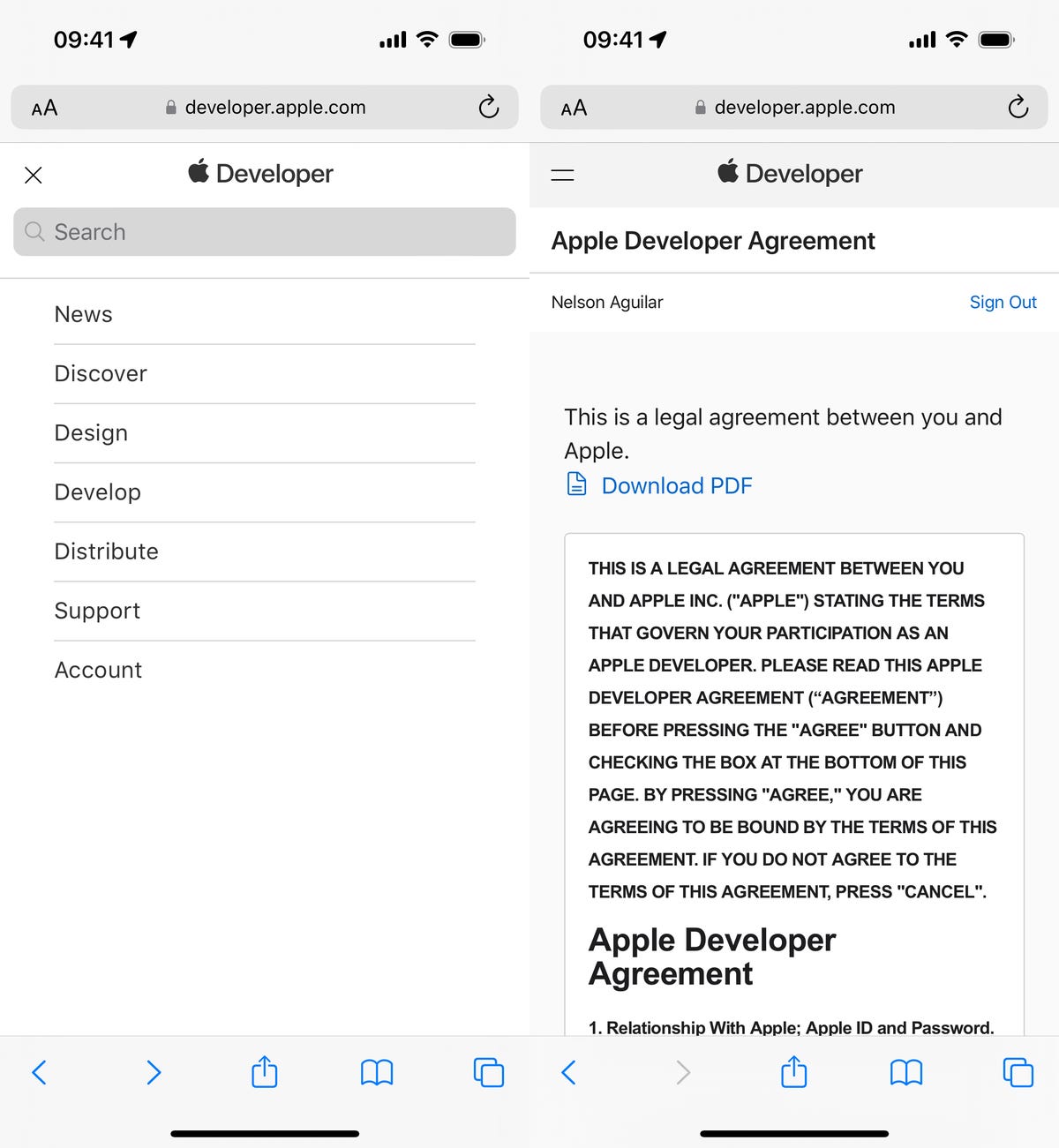
creating a free Apple Developer Program account for iOS 17

You can then scroll to Software Downloads to check out everything you can install, including the iOS 18.1 developer beta.

Screenshot by Nelson Aguilar/CNET

Install the iOS 18.1 developer beta over-the-air on your iPhone

You can download the iOS 18.1 developer beta manually, but the easiest way to do it is with an over-the-air update — just like you would download and install your regular iOS update. After you sign up for the Apple Developer program, you should see the option to download the iOS 18.1 developer beta in your settings.

To download the iOS 18.1 developer beta over-the-air, here’s what you need to do:

1. On your iPhone, go to the Settings > General > Software Update.

2. Next, go into Beta Updates and tap the iOS 18 Developer Beta option.

3. Finally, go back and tap Download and Install under the new “iOS 18.1 Developer Beta” option that appears.

iOS 18 developer update on iPhone

If you don’t see the iOS 18.1 beta option, you’ll need to wait a bit.

Screenshot: Nelson Aguilar/CNET

Enter your passcode, agree to the terms and conditions and then just wait for the update to install on your iPhone. Depending on your internet connection, the entire process should take about 10 or 15 minutes.

Once your phone reboots, you should be running the iOS 18.1 developer beta.

You can also download the iOS 18.1 developer beta with your Mac

The problem with an over-the-air update is that it requires a certain amount of storage, so if your storage is nearly full, you won’t be able to use the option in the previous section. Fortunately, you can use your computer to update to the iOS 18.1 developer beta.

1. On your Mac, go to this Apple Developer Program download page, find “iOS 18.1 beta,” click Download Restore Images and download the iOS beta software restore image for your iPhone model.

2. Connect your phone to your computer and enter your device passcode or hit Trust This Computer.

3. Open a Finder window and then click your device in the sidebar under Locations.

4. Finally, hold down the Option key, click Check for Update and choose the iOS 18.1 beta software restore image you just downloaded from the Apple Developer website.

iOS 18 beta download on Mac

If you have no storage on your iPhone, this is the way to go to get iOS 18.

Nelson Aguilar/CNET

The iOS 18.1 developer beta software will begin to install on your iPhone. Wait for a few minutes and when your phone reboots, you should have access to iOS 18.1.

How to sign up for the Apple Intelligence features

Once you download the iOS 18.1 developer beta, you must join a waitlist for Apple Intelligence. Go to Settings > Apple Intelligence & Siri and tap Join the Apple Intelligence Waitlist > Join Waitlist. It took a couple hours for Apple Intelligence to arrive on my phone, but some people have reported the AI features going live a few minutes after waitlisting.

Apple Intelligence waitlist page on the iPhone

Once the feature is live, you can go back here to disable

Nelson Aguilar/CNET

Once Apple Intelligence is available to you, you’ll receive a notification and you can go through a quick tutorial of some of the features that are now live, including Writing Tools and AI-powered Siri. You can go to the Apple Intelligence & Siri page to disable the setting if you no longer want to use it.

For more, check out how you’ll soon be able to use your iPhone on your Mac.



Source link

Tags: AppleBetadeveloperdownloadIntelligenceiosiPhone
Previous Post

Here’s everything we may see at Made by Google 2024

Next Post

30 Fashion Things Our Editor Is Shopping Now

Yorkshire Buzz

Next Post
30 Fashion Things Our Editor Is Shopping Now

30 Fashion Things Our Editor Is Shopping Now

Leave a Reply Cancel reply

Your email address will not be published. Required fields are marked *

  • Trending
  • Comments
  • Latest
George McEachran: Chesterfield sign ex-Grimsby midfielder

George McEachran: Chesterfield sign ex-Grimsby midfielder

24 June 2026
Ticket prices set to rise by 15p as Heathrow able to recover runway project money

Ticket prices set to rise by 15p as Heathrow able to recover runway project money

29 July 2026
Best Minecraft seeds 2026 – updated for 26.1

Best Minecraft seeds 2026 – updated for 26.1

24 May 2026
All Of Beth Dutton’s Scars, Explained

All Of Beth Dutton’s Scars, Explained

23 May 2026
Doctor Who’s Christmas Special Features The Coolest Teletubbies Connection Yet, And I’m Still Shocked

Doctor Who’s Christmas Special Features The Coolest Teletubbies Connection Yet, And I’m Still Shocked

0
Samsung’s Galaxy S23 Base, Plus, and Ultra: A Spec-By-Spec Comparison of Each Phone

Samsung’s Galaxy S23 Base, Plus, and Ultra: A Spec-By-Spec Comparison of Each Phone

0
Night Court’s Marsha Warfield (And Roz) Are Back and Speak About the Reboot

Night Court’s Marsha Warfield (And Roz) Are Back and Speak About the Reboot

0
Food shortages and strikes by health workers: York in 1974

Food shortages and strikes by health workers: York in 1974

0
Name the character

Name the character

31 October 2026
Google Pixel Watch 5 Sale: Its Lowest Price Yet (2026)

Google Pixel Watch 5 Sale: Its Lowest Price Yet (2026)

30 October 2026
Crypto giant Binance attempting to recover .3bn stolen in hack linked to North Korea

Crypto giant Binance attempting to recover $6.3bn stolen in hack linked to North Korea

30 October 2026
40 Years Later, Hellraiser Returns For Big New Era

40 Years Later, Hellraiser Returns For Big New Era

30 October 2026

Recent News

Name the character

Name the character

31 October 2026
Google Pixel Watch 5 Sale: Its Lowest Price Yet (2026)

Google Pixel Watch 5 Sale: Its Lowest Price Yet (2026)

30 October 2026
Crypto giant Binance attempting to recover .3bn stolen in hack linked to North Korea

Crypto giant Binance attempting to recover $6.3bn stolen in hack linked to North Korea

30 October 2026
40 Years Later, Hellraiser Returns For Big New Era

40 Years Later, Hellraiser Returns For Big New Era

30 October 2026
We use cookies on our website to give you the most relevant experience by remembering your preferences and repeat visits. By clicking “Accept All”, you consent to the use of ALL the cookies. However, you may visit "Cookie Settings" to provide a controlled consent.
Cookie SettingsAccept All
Manage consent

Privacy Overview

This website uses cookies to improve your experience while you navigate through the website. Out of these, the cookies that are categorized as necessary are stored on your browser as they are essential for the working of basic functionalities of the website. We also use third-party cookies that help us analyze and understand how you use this website. These cookies will be stored in your browser only with your consent. You also have the option to opt-out of these cookies. But opting out of some of these cookies may affect your browsing experience.
Necessary
Always Enabled
Necessary cookies are absolutely essential for the website to function properly. These cookies ensure basic functionalities and security features of the website, anonymously.
CookieDurationDescription
cookielawinfo-checkbox-analytics11 monthsThis cookie is set by GDPR Cookie Consent plugin. The cookie is used to store the user consent for the cookies in the category "Analytics".
cookielawinfo-checkbox-functional11 monthsThe cookie is set by GDPR cookie consent to record the user consent for the cookies in the category "Functional".
cookielawinfo-checkbox-necessary11 monthsThis cookie is set by GDPR Cookie Consent plugin. The cookies is used to store the user consent for the cookies in the category "Necessary".
cookielawinfo-checkbox-others11 monthsThis cookie is set by GDPR Cookie Consent plugin. The cookie is used to store the user consent for the cookies in the category "Other.
cookielawinfo-checkbox-performance11 monthsThis cookie is set by GDPR Cookie Consent plugin. The cookie is used to store the user consent for the cookies in the category "Performance".
viewed_cookie_policy11 monthsThe cookie is set by the GDPR Cookie Consent plugin and is used to store whether or not user has consented to the use of cookies. It does not store any personal data.
Functional
Functional cookies help to perform certain functionalities like sharing the content of the website on social media platforms, collect feedbacks, and other third-party features.
Performance
Performance cookies are used to understand and analyze the key performance indexes of the website which helps in delivering a better user experience for the visitors.
Analytics
Analytical cookies are used to understand how visitors interact with the website. These cookies help provide information on metrics the number of visitors, bounce rate, traffic source, etc.
Advertisement
Advertisement cookies are used to provide visitors with relevant ads and marketing campaigns. These cookies track visitors across websites and collect information to provide customized ads.
Others
Other uncategorized cookies are those that are being analyzed and have not been classified into a category as yet.
SAVE & ACCEPT
No Result
View All Result

© 2021 Yorkshire Buzz