














Yorkshire Buzz
Advertisement
  • Home
  • News
    • All
    • Business
    • Politics
    • Science
    • World
    Poundland supplier ‘angry’ with owners over administration

    Poundland supplier ‘angry’ with owners over administration

    Binance says fake job interviews used as part of .3bn crypto hack

    Binance says fake job interviews used as part of $6.3bn crypto hack

    What in the World – The ghost jobs haunting your job hunt

    What in the World – The ghost jobs haunting your job hunt

    Doncaster Council relationships ‘badly eroded’, says review

    Doncaster Council relationships ‘badly eroded’, says review

    Yorkshire mayors hail India trade mission as ‘no brainer’

    Yorkshire mayors hail India trade mission as ‘no brainer’

    Christmas 2026 stamps unveiled by Royal Mail

    Christmas 2026 stamps unveiled by Royal Mail

    Trending Tags

    • Trump Inauguration
    • White House
  • Tech
    • All
    • Apps
    • Gadget
    • Mobile
    • Startup
    Shooting Video With Honor’s New Magic 9 Pro Max Lets You Feel Like a Movie Director

    Shooting Video With Honor’s New Magic 9 Pro Max Lets You Feel Like a Movie Director

    Google looks like it’s working on a new YouTube time limit option

    Google looks like it’s working on a new YouTube time limit option

    The Lenovo IdeaPad Slim 5x Is Only 0 Right Now

    The Lenovo IdeaPad Slim 5x Is Only $900 Right Now

    Starbucks Drive-Thru AI Could Know What You Want Before You Do

    Starbucks Drive-Thru AI Could Know What You Want Before You Do

    I’ve used every Android foldable released this year. Here’s how the iPhone Duo stacks up

    I’ve used every Android foldable released this year. Here’s how the iPhone Duo stacks up

    5 of the best new Android apps you need to try this November

    5 of the best new Android apps you need to try this November

    Trending Tags

    • Nintendo Switch
    • Mark Zuckerberg
  • Entertainment
    • All
    • Gaming
    • Movie
    • Music
    • Sports
    7 Face-Sculpting Tools for Gentle Chiseling, Per Experts

    7 Face-Sculpting Tools for Gentle Chiseling, Per Experts

    Deontay Wilder backs one man to be the next undisputed heavyweight champion: “I really like him”

    Deontay Wilder backs one man to be the next undisputed heavyweight champion: “I really like him”

    Level Up: Competitive Gaming & Coaching Survey

    Level Up: Competitive Gaming & Coaching Survey

    Raphinha double sees Barca power past Villa

    Raphinha double sees Barca power past Villa

    What I Packed for a Fall Trip to the Swiss Alps

    What I Packed for a Fall Trip to the Swiss Alps

    25 Years Later, Gandalf’s Wisest Lord Of The Rings Quote Has No Equal In Fantasy Movie History

    25 Years Later, Gandalf’s Wisest Lord Of The Rings Quote Has No Equal In Fantasy Movie History

  • Lifestyle
    • All
    • Fashion
    • Food
    • Health
    • Travel
    Diptyque’s Enchanted Forest Holiday Collection Is Here

    Diptyque’s Enchanted Forest Holiday Collection Is Here

    7 Top Beauty Trends From Spring/Summer 2027 Fashion Month

    7 Top Beauty Trends From Spring/Summer 2027 Fashion Month

    Lagos Fashion Week 2026 Wraps Four Days of African Fashion

    Lagos Fashion Week 2026 Wraps Four Days of African Fashion

    Stuffed Sweet Potatoes

    Stuffed Sweet Potatoes

    Price, Plans, Is It Worth It

    Price, Plans, Is It Worth It

    Sephora Sale Shoppers With Taste Know About These 18 Picks

    Sephora Sale Shoppers With Taste Know About These 18 Picks

    Trending Tags

    • Golden Globes
    • Game of Thrones
    • eSports
  • Review
    The fastest handheld we’ve tested

    The fastest handheld we’ve tested

    Elegoo M1 Ultra 3D Scanner review

    Elegoo M1 Ultra 3D Scanner review

    Asus Googlebook 14 Review – Trusted Reviews

    Asus Googlebook 14 Review – Trusted Reviews

    Movavi Video Editor 27 review

    Movavi Video Editor 27 review

    Paleblue Voyager C USB-C Review

    Paleblue Voyager C USB-C Review

    Resident Evil 4 for Nintendo Switch 2 review: a good, but imperfect port

    Resident Evil 4 for Nintendo Switch 2 review: a good, but imperfect port

No Result
View All Result
  • Home
  • News
    • All
    • Business
    • Politics
    • Science
    • World
    Poundland supplier ‘angry’ with owners over administration

    Poundland supplier ‘angry’ with owners over administration

    Binance says fake job interviews used as part of .3bn crypto hack

    Binance says fake job interviews used as part of $6.3bn crypto hack

    What in the World – The ghost jobs haunting your job hunt

    What in the World – The ghost jobs haunting your job hunt

    Doncaster Council relationships ‘badly eroded’, says review

    Doncaster Council relationships ‘badly eroded’, says review

    Yorkshire mayors hail India trade mission as ‘no brainer’

    Yorkshire mayors hail India trade mission as ‘no brainer’

    Christmas 2026 stamps unveiled by Royal Mail

    Christmas 2026 stamps unveiled by Royal Mail

    Trending Tags

    • Trump Inauguration
    • White House
  • Tech
    • All
    • Apps
    • Gadget
    • Mobile
    • Startup
    Shooting Video With Honor’s New Magic 9 Pro Max Lets You Feel Like a Movie Director

    Shooting Video With Honor’s New Magic 9 Pro Max Lets You Feel Like a Movie Director

    Google looks like it’s working on a new YouTube time limit option

    Google looks like it’s working on a new YouTube time limit option

    The Lenovo IdeaPad Slim 5x Is Only 0 Right Now

    The Lenovo IdeaPad Slim 5x Is Only $900 Right Now

    Starbucks Drive-Thru AI Could Know What You Want Before You Do

    Starbucks Drive-Thru AI Could Know What You Want Before You Do

    I’ve used every Android foldable released this year. Here’s how the iPhone Duo stacks up

    I’ve used every Android foldable released this year. Here’s how the iPhone Duo stacks up

    5 of the best new Android apps you need to try this November

    5 of the best new Android apps you need to try this November

    Trending Tags

    • Nintendo Switch
    • Mark Zuckerberg
  • Entertainment
    • All
    • Gaming
    • Movie
    • Music
    • Sports
    7 Face-Sculpting Tools for Gentle Chiseling, Per Experts

    7 Face-Sculpting Tools for Gentle Chiseling, Per Experts

    Deontay Wilder backs one man to be the next undisputed heavyweight champion: “I really like him”

    Deontay Wilder backs one man to be the next undisputed heavyweight champion: “I really like him”

    Level Up: Competitive Gaming & Coaching Survey

    Level Up: Competitive Gaming & Coaching Survey

    Raphinha double sees Barca power past Villa

    Raphinha double sees Barca power past Villa

    What I Packed for a Fall Trip to the Swiss Alps

    What I Packed for a Fall Trip to the Swiss Alps

    25 Years Later, Gandalf’s Wisest Lord Of The Rings Quote Has No Equal In Fantasy Movie History

    25 Years Later, Gandalf’s Wisest Lord Of The Rings Quote Has No Equal In Fantasy Movie History

  • Lifestyle
    • All
    • Fashion
    • Food
    • Health
    • Travel
    Diptyque’s Enchanted Forest Holiday Collection Is Here

    Diptyque’s Enchanted Forest Holiday Collection Is Here

    7 Top Beauty Trends From Spring/Summer 2027 Fashion Month

    7 Top Beauty Trends From Spring/Summer 2027 Fashion Month

    Lagos Fashion Week 2026 Wraps Four Days of African Fashion

    Lagos Fashion Week 2026 Wraps Four Days of African Fashion

    Stuffed Sweet Potatoes

    Stuffed Sweet Potatoes

    Price, Plans, Is It Worth It

    Price, Plans, Is It Worth It

    Sephora Sale Shoppers With Taste Know About These 18 Picks

    Sephora Sale Shoppers With Taste Know About These 18 Picks

    Trending Tags

    • Golden Globes
    • Game of Thrones
    • eSports
  • Review
    The fastest handheld we’ve tested

    The fastest handheld we’ve tested

    Elegoo M1 Ultra 3D Scanner review

    Elegoo M1 Ultra 3D Scanner review

    Asus Googlebook 14 Review – Trusted Reviews

    Asus Googlebook 14 Review – Trusted Reviews

    Movavi Video Editor 27 review

    Movavi Video Editor 27 review

    Paleblue Voyager C USB-C Review

    Paleblue Voyager C USB-C Review

    Resident Evil 4 for Nintendo Switch 2 review: a good, but imperfect port

    Resident Evil 4 for Nintendo Switch 2 review: a good, but imperfect port

No Result
View All Result
Yorkshire Buzz
No Result
View All Result
Home Tech Gadget

How To Factory Reset Your MacBook: Tips and Tricks You Need to Know

by Yorkshire Buzz
2 October 2024
in Gadget
0
How To Factory Reset Your MacBook: Tips and Tricks You Need to Know
0
SHARES
7
VIEWS
Share on FacebookShare on Twitter


Has your MacBook started slowing down or overheating? Perhaps you’re looking to upgrade to the M3 MacBook Air released earlier this year or want to size up to a 14-inch or 16-inch MacBook Pro. Whatever your reason for upgrading to a new Mac, you might offset the cost by selling your old one. Before you box up your MacBook, however, there are a few steps to make the transition to your new machine a smooth and safe one. You’ll likely want to migrate your data to your new Mac, and you’ll definitely need to wipe your old Mac clean. 

Whether you’re selling your Mac, handing it down to a family member or friend, recycling it or donating it to an organization, you’ll want to erase your personal information and files before parting with it. It’s a crucial security measure you don’t want to skip. Your Mac’s hard drive is bursting with sensitive information that you wouldn’t want to be accessible, even if you trust your laptop’s next owner. There’s always a chance that some malware could snake its way in and uncover your personal details.

Ready to remove all traces of your data and return your old Mac to its default factory settings? The specific steps you need to take will depend on what MacBook model and operating system you’re working with. We’ve listed out the steps for newer models (running on Monterey OS or later and equipped with Apple Silicon or the Apple T2 security chip) and older MacBooks, so you can follow whichever guide applies to your laptop.

How to factory reset a newer MacBook on macOS Monterey or later

Newer MacBook models have an erase assistant built in to their settings to help you quickly clear your data and factory reset your MacBook. If your MacBook is running on macOS Monterey or later and has either an Apple Silicon or an Apple T2 security chip, you should have access to the Erase All Content and Settings function.

1. Open the erase assistant

If you’re running macOS Ventura or later, click on the Apple icon in the corner of your screen, then select System Settings. Choose General > Transfer or Reset > Erase All Content and Settings. The erase assistant will then open up.

If you’re running macOS Monterey, lick on the Apple icon in the corner of your screen, then select System Preferences. From the menu bar, choose Erase All Content and Settings. If your laptop supports it, the erase assistant will then appear.

If you don’t see the Erase All Content and Settings option or get an error message stating that the erase assistant is not supported on your MacBook, you may have an older model and you’ll need to use a different approach to reset it. Scroll down to our second set of instructions below for older MacBooks.

2. Follow the onscreen instructions and review your data

The erase assistant will show you a summary of what’ll be erased. Then follow the onscreen directions to continue with the factory reset. You’ll need to enter your administrator credentials for your MacBook. Next, enter your Apple account login to sign the MacBook out of Find My.

You may be asked if you want to backup your data before proceeding with the reset process. If you forgot to do this earlier, it’s a good idea to pause and back up your data to an external hard drive before you erase everything.

3. Confirm that you want to erase all content and settings

MacBook screen confirming that data and settings will be erased.

Apple

A window will pop up confirming that your data and settings will be permanently erased if you proceed. If you’re ready to proceed, select Erase All Content & Settings to confirm that you want to reset your MacBook.

Your laptop will then begin the process of removing all of your data and will restart. Your screen may go dark during this portion of the process or you may see a progress bar. You may be asked to reconnect to your Wi-Fi network during this deletion process, too. Your laptop will also generally disconnect from Bluetooth accessories such as your mouse or external keyboard.

Once the reset is complete, you’ll see the Activate Mac screen, indicating that your MacBook has been reset to factory settings and can now be sold or recycled. If you’re keeping the laptop or want to set it up to give to a family member, you can use the Setup Assistant to begin the setup process from scratch.

Activate Mac screen on a MacBook

Apple

How to factory reset an older MacBook

If you’re running an earlier operating system or have an older model without the Apple Silicon or T2 chip, you’ll need to follow a slightly longer process to wipe your data before selling or donating your MacBook.

1. Sign out of your accounts

After migrating your data to your new Mac or making one last backup to preserve your data, it’s time to remove all traces of yourself from the machine. First, you’ll need to sign out of all of your accounts. Years ago, this was done using iTunes, but you now must individually sign out of three apps — Music, TV and Books. Open up any of those apps and go to Account > Authorizations > Deauthorize This Computer. You’ll need to enter your Apple ID and password and then hit the Deauthorize button.

Deauthorizing an app on MacOS

Matt Elliott/CNET

Next, turn off Find My Mac and sign out of iCloud. Go to System Preferences > Apple ID, click iCloud in the left panel and then uncheck Find My Mac. Next, click Overview from the left panel and then click the Sign Out button.

Lastly, you’ll need to sign out of Messages. Open the Messages app, go to Messages > Preferences, click the iMessage tab and then click Sign Out.

2. Bluetooth unpairing

If you’re handing down your old Mac to your kid or someone else in your house, then it’s a good idea to unpair any Bluetooth devices so your mouse or keyboard controls the new Mac without interfering with the old one. Go to System Preferences > Bluetooth, mouse over the device you want to unpair, click the X button to the right of its name, then click Remove.
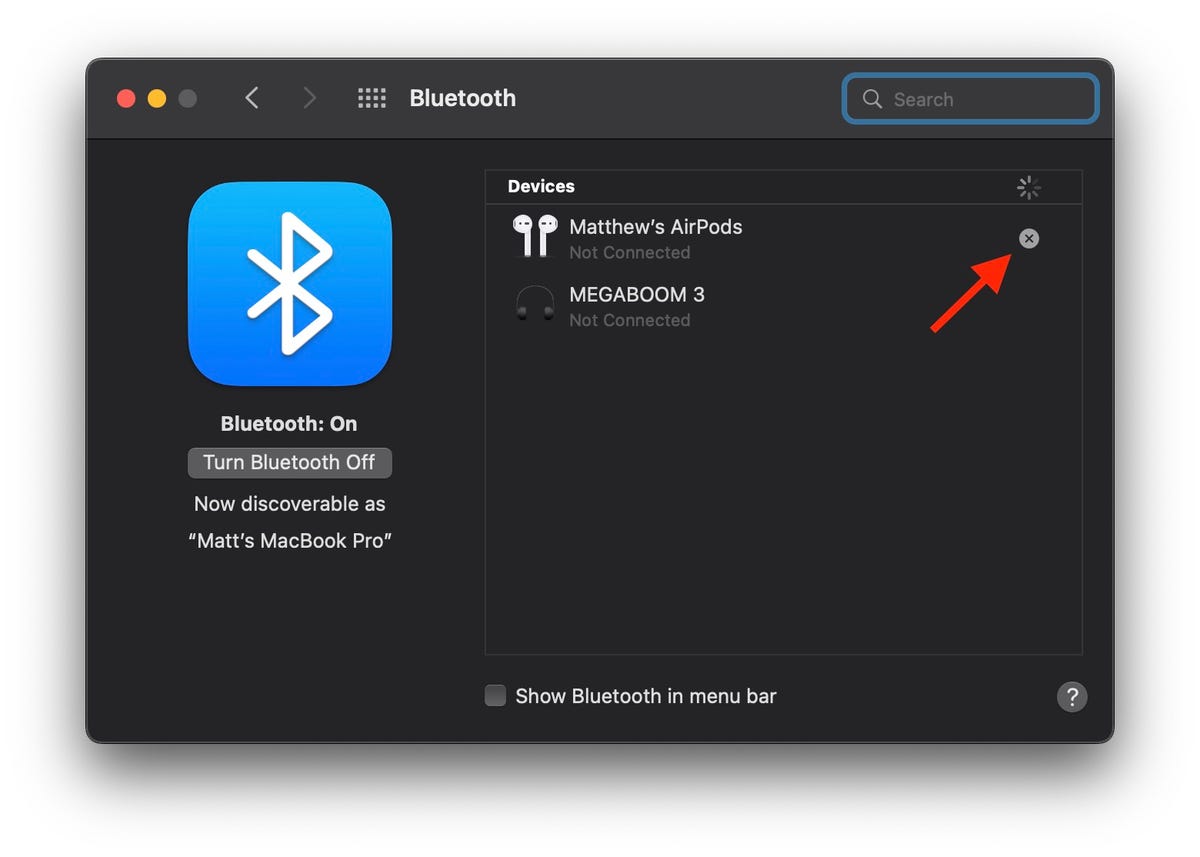
Bluetooth unpairing on a Mac

Matt Elliott/CNET

3. Reset NVRAM

NVRAM is memory where your Mac stores essential settings needed before loading macOS, such as screen resolution, time zone, volume level and startup disk selection. Sometimes these files can get corrupted, so give your Mac’s next owner a fresh start by resetting the NVRAM. To do so, shut down your Mac, then turn it on and immediately press and hold four keys together: Option, Command, P, and R. You can release the keys after 20 seconds or so. That’s it! Your Mac’s NVRAM has been reset.

4. Factory reset

You need to put your MacBook into Recovery Mode in order to erase all of your data and reinstall MacOS. To enter Recovery Mode on an old Intel-based Mac, restart it and immediately press and hold Command-R. You can release the keys once you see the Apple logo. On an M1-based Mac, booting into Recovery Mode is slightly different. You simply press and hold the power button until you see the startup options window, then click Options and Continue to get to the utilities window.)
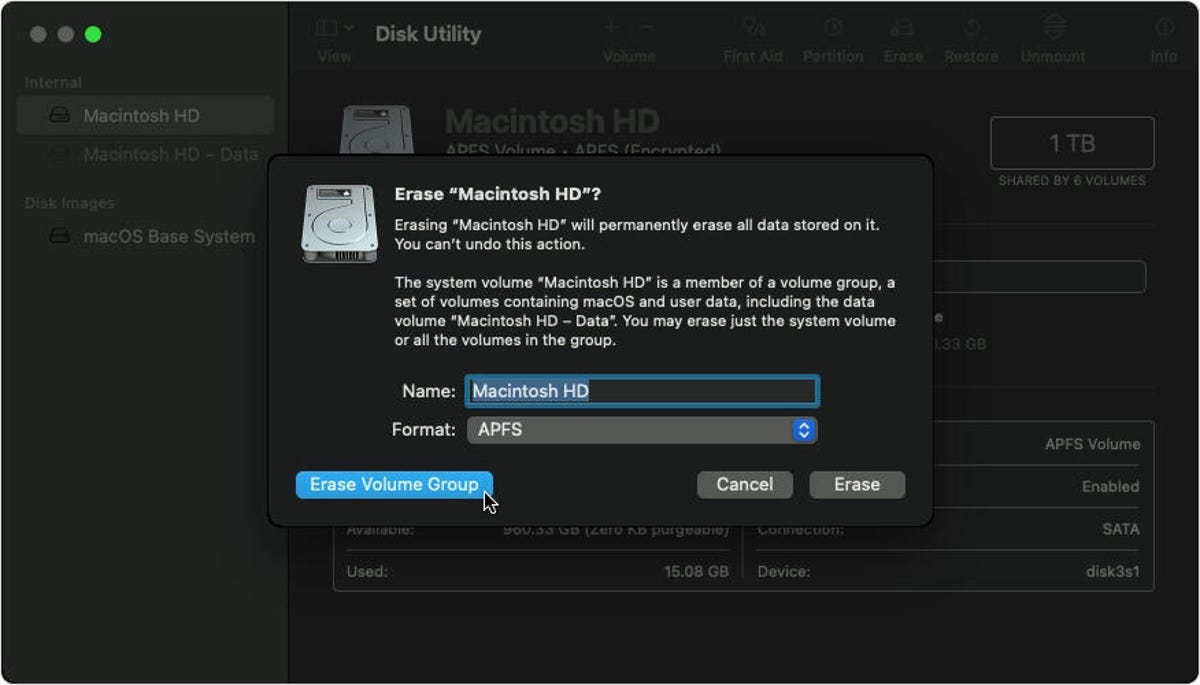
macos-disk-utility-erase-volume

Apple

Next, you’ll see the MacOS Utilities window. Choose Disk Utility, click Continue and select your startup disk — unless you renamed it, odds are it’s labeled Macintosh HD or something similar. Next, click the Erase button at the top of the Disk Utility window and fill out these two fields:

  • Name: Choose a name for the fresh, new volume. Why not go with the tried-and-true Macintosh HD?
  • Format: Choose APFS. 

If you’re trying to sell an ancient Mac that has a mechanical hard drive instead of a solid-state drive, then choose Mac OS Extended (Journaled) for Format.

Next, click the Erase Volume Group and after Disk Utility does its thing, quit Disk Utility. (If you don’t see the Erase Volume Group button in the lower-left corner, then click the Erase button in the lower-right corner instead.)

You should return to the MacOS Utilities window. (If not, restart your Mac again, holding down Command-R while it reboots.) From the MacOS Utilities window, select Reinstall MacOS and follow the instructions to install the operating system. After MacOS has been reinstalled, you’ll be greeted by the Setup Assistant, which you can then quit out of and shut down your Mac. It’s now ready for a fresh start with its next owner.

Here’s how to factory reset an iPhone, how to reset AirPods that are acting up, and how to reset a Chromebook in under a minute.






Source link

Tags: factoryMacBookResetTipstricks
Previous Post

More award success for East Yorkshire poultry producer

Next Post

Focal Diva Utopia Review | Trusted Reviews

Yorkshire Buzz

Next Post
Kevin McCloud on all things Grand Designs amid 25th anniversary

Kevin McCloud on all things Grand Designs amid 25th anniversary

Leave a Reply Cancel reply

Your email address will not be published. Required fields are marked *

  • Trending
  • Comments
  • Latest
George McEachran: Chesterfield sign ex-Grimsby midfielder

George McEachran: Chesterfield sign ex-Grimsby midfielder

24 June 2026
Ticket prices set to rise by 15p as Heathrow able to recover runway project money

Ticket prices set to rise by 15p as Heathrow able to recover runway project money

29 July 2026
Best Minecraft seeds 2026 – updated for 26.1

Best Minecraft seeds 2026 – updated for 26.1

24 May 2026
All Of Beth Dutton’s Scars, Explained

All Of Beth Dutton’s Scars, Explained

23 May 2026
Doctor Who’s Christmas Special Features The Coolest Teletubbies Connection Yet, And I’m Still Shocked

Doctor Who’s Christmas Special Features The Coolest Teletubbies Connection Yet, And I’m Still Shocked

0
Samsung’s Galaxy S23 Base, Plus, and Ultra: A Spec-By-Spec Comparison of Each Phone

Samsung’s Galaxy S23 Base, Plus, and Ultra: A Spec-By-Spec Comparison of Each Phone

0
Night Court’s Marsha Warfield (And Roz) Are Back and Speak About the Reboot

Night Court’s Marsha Warfield (And Roz) Are Back and Speak About the Reboot

0
Food shortages and strikes by health workers: York in 1974

Food shortages and strikes by health workers: York in 1974

0
7 Face-Sculpting Tools for Gentle Chiseling, Per Experts

7 Face-Sculpting Tools for Gentle Chiseling, Per Experts

4 November 2026
Diptyque’s Enchanted Forest Holiday Collection Is Here

Diptyque’s Enchanted Forest Holiday Collection Is Here

4 November 2026
Deontay Wilder backs one man to be the next undisputed heavyweight champion: “I really like him”

Deontay Wilder backs one man to be the next undisputed heavyweight champion: “I really like him”

4 November 2026
Shooting Video With Honor’s New Magic 9 Pro Max Lets You Feel Like a Movie Director

Shooting Video With Honor’s New Magic 9 Pro Max Lets You Feel Like a Movie Director

4 November 2026

Recent News

7 Face-Sculpting Tools for Gentle Chiseling, Per Experts

7 Face-Sculpting Tools for Gentle Chiseling, Per Experts

4 November 2026
Diptyque’s Enchanted Forest Holiday Collection Is Here

Diptyque’s Enchanted Forest Holiday Collection Is Here

4 November 2026
Deontay Wilder backs one man to be the next undisputed heavyweight champion: “I really like him”

Deontay Wilder backs one man to be the next undisputed heavyweight champion: “I really like him”

4 November 2026
Shooting Video With Honor’s New Magic 9 Pro Max Lets You Feel Like a Movie Director

Shooting Video With Honor’s New Magic 9 Pro Max Lets You Feel Like a Movie Director

4 November 2026
We use cookies on our website to give you the most relevant experience by remembering your preferences and repeat visits. By clicking “Accept All”, you consent to the use of ALL the cookies. However, you may visit "Cookie Settings" to provide a controlled consent.
Cookie SettingsAccept All
Manage consent

Privacy Overview

This website uses cookies to improve your experience while you navigate through the website. Out of these, the cookies that are categorized as necessary are stored on your browser as they are essential for the working of basic functionalities of the website. We also use third-party cookies that help us analyze and understand how you use this website. These cookies will be stored in your browser only with your consent. You also have the option to opt-out of these cookies. But opting out of some of these cookies may affect your browsing experience.
Necessary
Always Enabled
Necessary cookies are absolutely essential for the website to function properly. These cookies ensure basic functionalities and security features of the website, anonymously.
CookieDurationDescription
cookielawinfo-checkbox-analytics11 monthsThis cookie is set by GDPR Cookie Consent plugin. The cookie is used to store the user consent for the cookies in the category "Analytics".
cookielawinfo-checkbox-functional11 monthsThe cookie is set by GDPR cookie consent to record the user consent for the cookies in the category "Functional".
cookielawinfo-checkbox-necessary11 monthsThis cookie is set by GDPR Cookie Consent plugin. The cookies is used to store the user consent for the cookies in the category "Necessary".
cookielawinfo-checkbox-others11 monthsThis cookie is set by GDPR Cookie Consent plugin. The cookie is used to store the user consent for the cookies in the category "Other.
cookielawinfo-checkbox-performance11 monthsThis cookie is set by GDPR Cookie Consent plugin. The cookie is used to store the user consent for the cookies in the category "Performance".
viewed_cookie_policy11 monthsThe cookie is set by the GDPR Cookie Consent plugin and is used to store whether or not user has consented to the use of cookies. It does not store any personal data.
Functional
Functional cookies help to perform certain functionalities like sharing the content of the website on social media platforms, collect feedbacks, and other third-party features.
Performance
Performance cookies are used to understand and analyze the key performance indexes of the website which helps in delivering a better user experience for the visitors.
Analytics
Analytical cookies are used to understand how visitors interact with the website. These cookies help provide information on metrics the number of visitors, bounce rate, traffic source, etc.
Advertisement
Advertisement cookies are used to provide visitors with relevant ads and marketing campaigns. These cookies track visitors across websites and collect information to provide customized ads.
Others
Other uncategorized cookies are those that are being analyzed and have not been classified into a category as yet.
SAVE & ACCEPT
No Result
View All Result

© 2021 Yorkshire Buzz