

















Blink Mini 2 review: two-minute review
The Blink Mini 2 is a home security camera that can be used indoors, and outside when combined with the Blink Weather Resistant Power Adapter sold separately. It has a list price of $39.99 / £34.99 / AU$69 and is available to buy at Amazon.
Blink has followed in many other brands footsteps and requires you to pay a subscription fee to access recordings and most of the Blink Mini 2’s features. However, the camera does have the benefit of manual recording backup, though this will require an additional purchase of the Blink Sync Module 2 and a compatible USB drive.
The setup process was blissfully straightforward, and the Blink Home Monitor app worked well for the most part, aside from a couple of random glitches and the over-complicated process of getting to the device settings from the homepage.
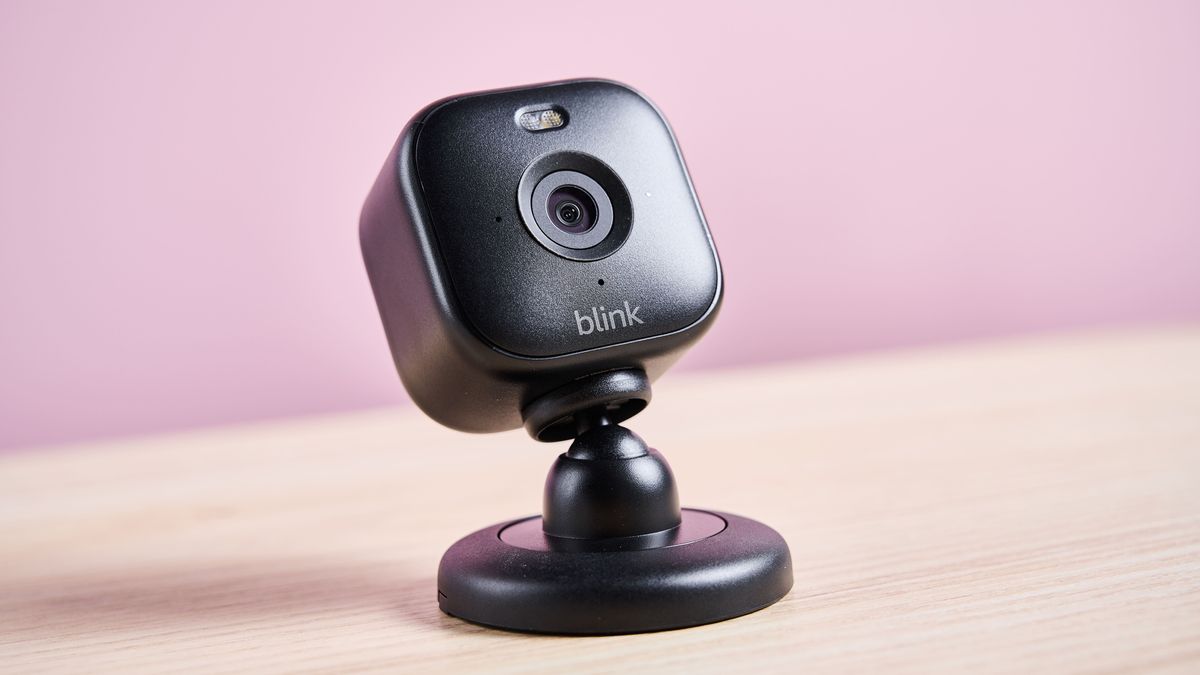
The design of the Blink Mini 2 is small and simple; the camera is cube-shaped and sits on a ball joint that connects it to the compact circular base slash bracket, depending on whether it’s placed on a surface or fixed to a wall or ceiling. The ball joint only allows for manual repositioning, so regrettably, unlike many of the best home security cameras, there’s no capacity for remote control movement, meaning I could only view one static area at a time. Unfortunately, it doesn’t have a privacy cover, so while camera and audio feeds can be disconnected in the app, if multiple people have access there’s no guarantee of privacy while the camera is operational.
The activity and privacy zones did their job well. However, the process to select the areas was basic and was limited to a square or rectangular shape, which isn’t ideal if you want to block off your neighbor’s yard but the boundary isn’t straight or at the right angle. The privacy zones were also unsightly on the feed and recorded footage, replacing the area with an expanse of grey.
In terms of performance, the Blink Mini 2 didn’t bowl me over. The video and audio quality were disappointing, but not bad considering how cheap the hardware is. The footage was grainy on the default standard image quality setting, and the picture pixelated when there was movement on the screen. The best picture quality setting fared better, with little pixelation and a slight improvement to the graininess.

For the most part, motion detection and person detection worked well. I needed to up the motion sensitivity from the default level of five to seven as it didn’t detect me on my return to the room. The Blink Mini 2 didn’t detect my cats when it was set to this sensitivity level, but there were a few occasions when it recognized my cats as people when I upped it to the maximum setting of nine.
Overall, I wasn’t blown away by the Blink Mini 2, but for the price, it’s a good basic camera for those who don’t require crystal-clear footage or audio, and are just looking for something that won’t cost the earth to keep an eye on a particular area. If you’d like to check out some alternatives I recommend checking out our best home security cameras buying guide, which features several alternatives tailored to specific requirements.
Blink Mini 2 review: price and availability
- List price: $39.99 / £34.99 / AU$69
- Availability: US, UK, and Australia
- Release date: May 2024
The Blink Mini 2 is available at a list price of $39.99 / £34.99 / AU$69, which is fairly low cost for a smart indoor/outdoor home security camera. It was released in May 2024 and is available to purchase at Amazon, which is no coincidence when Blink is in fact an Amazon company.
An upgrade to the previous generation, the Blink Mini, the Blink Mini 2 has been given some welcome new features including color night view, a wider field of view of 143 degrees and a built-in spotlight as standard. Additionally, it offers person detection and can be used outdoors, but additional purchases are required.
It’s a big positive that it’s possible to store recordings locally, which requires an additional Blink device and a compatible USB drive. As with other smart home security cameras, it also offers a cloud subscription service that gives access to recordings and additional features via the Blink Home Monitor app, downloadable from the App Store, Google Play, or Amazon Appstore.
If you intend to store your recordings locally, you’ll need to purchase a Blink Sync Module 2, and a suitable USB flash drive, which will save photos and videos from up to ten Blink cameras. Without a subscription plan, you’ll have access to your recordings if you’re backing them up via the Blink Sync Module 2 (but you’ll have to back them up manually), will receive motion-activated notifications, and can access the live view for up to five minutes at a time. It’s worth stressing here that if you choose not to continue with the initial free trial all recordings will be deleted, so make sure to back them up first if you take this route.
Blink Mini 2 subscription options
Blink Basic Plan:
In addition to the features available without a plan, you also get live view and motion event recording, unlimited cloud storage for up to 60 days, automatic local storage backup every 24 hours, instant video access, video sharing, person detection, and photo capture. Applicable to one device only.
Price: $3 / £2.50 / AU$4.95 per month, $30 / £24.99 / AU$49.95 per year

Blink Plus Plan:
Along with the benefits of the Basic Plan, you’re able to snooze notifications, get 10% off Blink device purchases at Amazon, and use the Blink Moments feature, which seamlessly stitches together multiple events into one video. Applicable to all Blink devices.
Price: $10 / £8 / AU$15 per month, $100 / £80 / AU$150 per year
Blink Mini 2 review: specifications
| Price | $39.99 / £34.99 / AU$69 |
| Resolution | Up to 1080p HD |
| Motion detection | Yes – customizable in app |
| Dimensions | 2 x 2 x 1.5 inches / 51 x 51 x 40mm |
| Audio | Two-way audio |
| Connectivity | Wi-Fi |
| Power supply | Plug-in power, USB-C in, USB-A power adapter |
| Privacy cover | No |
| Field of view | 143-degree diagonal |
| Storage | Cloud subscription. Manual backup possible with Blink Sync Module 2 and USB flash drive |
Blink Mini 2 review: design and features
- Easy setup
- No privacy cover
- No remote control capabilities
The setup process was fairly quick and simple, I just needed to download the Blink Home Monitor app, scan the barcode on the back of the Blink Mini 2, and follow the step-by-step instructions. The only small stumbling block was when the app claimed that my phone failed to connect to the Mini 2’s Wi-Fi hotspot automatically and to select it manually in my Wi-Fi settings. Before I got to my settings, the app pinged me a notification to let me know that the camera had connected successfully, so we got there in the end.
Available in black or white, the Blink Mini 2 is similar in size to its predecessor and has a rather dazzling spotlight above the camera lens that can be toggled on or off from the app. The camera sits on a sturdy but easily adjustable ball joint that connects it to the base, but this is only for manual positioning, meaning it cannot be moved remotely.

As an indoor/outdoor camera, the Blink Mini 2 can sit happily on a flat surface on its stand or can be screwed to a wall or ceiling using the bracket that’s integrated into the base. It’s worth noting that to use outside it will require the Blink Weather Resistant Power Adapter, which is sold separately.
Along with the Sync Module 2, the Blink Mini 2 can connect to other Blink devices, such as the Blink Video Doorbell, transforming the Mini 2 into a plug-in chime every time the doorbell rings.
Unlike some other indoor cameras, such as the 4.5-star rated Ring Pan-Tilt Indoor Cam, the Blink Mini 2 doesn’t feature a privacy cover, so there’s no way to manually cut the audio and visual feed to the camera short of just unplugging it. It was possible to block the camera view via the app if necessary by setting a privacy zone, though.

When I set one of these zones up myself to check how efficient they were, the live feed kept showing me the spinning-wheel-of-doom and wouldn’t load, so it seemed to struggle with this extra requirement initially. The video clips still recorded when spotting movement, however, and it was undoubtedly clear where the privacy zone was, as the image in this area was covered by a grey rectangle. By the time I’d finished testing this, the live feed had gotten itself back together, and the privacy area was again marked by a grey block, so nothing was viewable within that area.
It’s also possible to disable video recording and, as promised, it didn’t record anything after I switched it on. There’s also a setting to disable the audio connection, and true enough after applying this setting it cut off the feed to the microphone both on the live view and in recorded footage, so it was still possible to see what was going on but no sound was present. So while these are good features, privacy cannot be guaranteed if others can access the camera feed.
- Design and features score: 3 / 5
Blink Mini 2 review: performance
- Some lag and pixelization
- Privacy areas work well, but they’re unattractive
- Standard IR night vision performs better than best daytime setting
I used the Blink Home Monitor app to enable the different settings for testing and to view the live feed and recordings. In my opinion, the process required to get to the camera’s settings is somewhat inefficient. To access the camera settings for the Blink Mini 2 from the homepage I had to go into the settings menu, into device and system settings, then into Office (which is what I’d named my location), click on an inconspicuous all devices button, then click on TechRadar Office (the name of my Blink Mini 2), before I’m finally shown the device settings that I need. Admittedly, if I clicked on the three dots icon from the live view and then tapped device settings, it got me there too, but if you install a few cameras or devices at once, getting to the devices’ settings all gets a bit long-winded.
Video quality is set to standard by default, and although I wasn’t impressed with it, it was acceptable for the low price. The footage and live view were quite grainy, and some pixelization occurred when movement was present on the screen. This isn’t what I expected to see after viewing the marketing material, but at a $40 price tag, I suppose you get what you pay for.
The other two settings available were saver mode, which reduces video quality, and best, which is meant to be higher quality. The best footage was still grainy – but not as severely as it was in standard mode – and it did seem to pixelate less when there was movement present, so there was some improvement.

As was the case with the Ring Pan-Tilt Indoor Cam, the Blink Mini 2’s Night View in Color was only functional with enough ambient light. I found that I needed an LED lamp on in the corner at medium brightness for the image to be colored, and it did a good job of that. But if the environment was any darker than this it reverted to the standard black and white mode that we’re used to from other indoor security cameras. The black and white infrared night vision picture quality was great, and an improvement on the normal quality that’s recorded in daylight.
The audio quality left me unimpressed. There was loud static noise when there wasn’t any sound to relay, and voices weren’t particularly clear – but it was adequate enough for a cheaply priced security camera.
It was frustrating that clips didn’t auto-record if I happened to be viewing the live feed when an event happened. There was a button to save the recording on the bottom right of the screen, which is helpful and means that the clip can be saved. But I can err on the forgetful side, so if I happened to be looking at the feed when a burglar broke in, for example, I might well forget to hit save before coming off the feed to call the police.

I tested out the privacy and activity zones and found that the selection process is a little more restricted than in other brand’s apps, like Ring, for example. Instead of having adjustable multi-point areas, the Blink Home Monitor app only offers square privacy zones, with just four adjustable points. The activity zone area selection was even more basic, with an 8×8 grid of selectable rectangles. There was an advanced button I could click, but this only zoomed in on the image and offered more rectangles, so setting up the activity zones proved far more laborious than I’m used to. Nonetheless, the privacy zones worked, although it meant dealing with large grey squares over the live view and footage where I’d set them, which wasn’t the most aesthetically pleasing.
Although my iPhone 12 Pro worked fine for viewing recorded content, and I could view it on my iPad too, I would have liked the option to view it on a browser as I could with some other brands’ camera feeds. So if you wanted to use Blink cameras to watch over your business, or to keep track of your pets around the house, you’re limited to smaller screens to do this.
I kept the motion sensitivity on the default setting of five, to begin with, and for the most part, it worked well. Unfortunately, though, it missed me a few times when I came back in from leaving my living room. It had detected me each time I left, but despite me facing the camera each time I reentered a little while later, it didn’t react upon my return. I raised the sensitivity level to eight, and it detected me that time, so it’s worth testing out which sensitivity works best for you if you purchase a Blink Mini 2.

At the same time, I was testing the motion detection, and I also tested out the person detection setting, which is meant to limit motion recordings and alerts to only trigger when a person is present. My two Maine-Coon-cross cats were the perfect test subjects for this experiment. They didn’t set off the motion recording when the motion sensitivity was set to seven; however, when it was set to nine, which is the highest setting available, it detected my bigger cat, Mr Jinkx, on a few occasions that he wandered through the viewing area. On the other hand, it only detected his daintier sister, who is only slightly larger than the average cat, on one occasion when she jumped onto the TV cabinet (and made a lot of noise while doing it). So I’d wager that you may get away with not receiving unnecessary notifications if you have a standard-sized pet cat, but it could be a different story if your pets are any larger.
It was really easy for me to share recorded videos. I simply had to swipe left on the clip I wanted to send from the list, and it showed me the options to share or delete. Unfortunately, though, the first time I did this it caused the app to fall over. It returned to the clip list with the share screen still visible, and wouldn’t acknowledge any of my taps, so I had to force quit the app and reopen it. The recording did send, however, so that’s a positive, and the camera continued to detect my movements. I’m pleased to say I didn’t experience any further issues sharing clips after this occasion, though.
When I tried to share a clip of Mr Jinkx sitting on the window sill, I found I couldn’t unlink it from the next clip, which also included me, having to tell him that he can’t jump through a closed skylight. Eventually, I found that the icon of a film snippet and a clock on the “cloud storage” bar at the bottom of the screen was to switch the list of recorded footage from moments to separate events. I’m glad the function was there, but as it looked more like a scheduling icon I didn’t find it very clear.
- Performance score: 3.5 / 5
Should I buy the Blink Mini 2?
| Attributes | Notes | Score |
|---|---|---|
| Price | Despite its downsides, this home security camera is well-priced, and the option to save footage locally is always a big plus. It’s just a shame that additional purchases are required to do this, and a subscription is required to access most of the features. | 4/5 |
| Design | The Blink mini 2 is compact, lightweight, and easy to set up. However, it lacks remote adjustment, so you have to settle for static viewing areas. It doesn’t have a privacy cover either, so others could view the feed or listen in if they have access to the camera on the app. | 3/5 |
| Performance | The image and audio quality are disappointing, but not terrible for the price. The color night vision feature worked well with ambient light, and the IR night vision was better quality than footage filmed in daylight. The customization of the privacy areas was limited, and they looked unsightly on the video footage, but they did the job. | 3.5/5 |
Buy it if…
Don’t buy it if…
Blink Mini 2 review: Also consider
| Header Cell – Column 0 | Blink Mini 2 | Ring Pan-Tilt Indoor Cam | Wyze Cam v3 |
|---|---|---|---|
| Price | $39.99 / £34.99 / AU$69 | $79.99 / £69.99 / AU$129 | $36 / £56 / AU$59.99 |
| Camera resolution | Up to 1080p | 1080p | 1080p |
| Motion detection | Yes – customizable in app | Yes – customizable | Yes – customizable |
| Dimensions | 2 x 2 x 1.5 inches / 51 x 51x 40mm | 2.37 x 2.37 x 5.78 inches / 60 x 60 x 147mm | 2.05 x 2 x 2.3 inches / 52 x 51 x 58.5 mm |
| Audio specs | Two-way audio | Two-way audio with noise cancellation | Two-way audio and sound detection |
| Connectivity | Wi-Fi | Wi-Fi | Wi-Fi |
| Privacy cover | No | Yes – cover cuts audio and visual | No |
| Field of view | 143-degree diagonal | 143-degree diagonal360-degree pan 169-degree tilt | 121-degree diagonal |
| Storage | Cloud subscription, local manual backup possible with Blink Sync Module 2 and USB flash drive | Cloud only – subscription required | Cloud subscription and local – up to 128GB microSD (with restrictions) |
| Power supply | Plug-in power, USB-C in, USB-A power adapter | Plug-in power, USB-C in, USB-A power adapter | Plug-in power, micro-USB in, USB A power adapter |
How I tested the Blink Mini 2
- I tested it for a week at home and in a busy office
- I tested the sound and video quality, live and recorded
- I tested the ease of setup, usability, privacy settings, and motion detection
I reviewed how easy the Blink Mini 2 was to set up, and tested its app and features.
I tested the Blink Mini 2 in our busy TechRadar reviews office along with a quieter area of my home to establish how sensitive the motion detection was, and how efficient the privacy and activity zones were.
I tested the frequency of notifications and reviewed live and recorded footage, paying close attention to the visual and sound quality, and evaluating how well the camera handled movement.
I observed how well the Night Color Vision worked in different environments, testing how well it performed in darkness and with varying levels of ambient lighting.
I compared the Blink Mini 2 against our previous camera reviews, and benchmarked it against other indoor cameras I am currently testing.
Read more about how we test.
First reviewed October 2024