


















The “new” AMD 800-series chipsets and their accompanying motherboards are now officially released. So, if you’re looking to buy one, you can now – but should you? What do these new motherboards have to offer, how do they perform, and how much do they cost?
We’ll be covering all of that today as we kick off our X870E content with flagship models from Asus, Asrock, Gigabyte, and MSI.
Actually, we don’t have MSI’s $700 Godlike because it was delayed, so the Carbon will have to do. But before diving into the boards, what’s the difference between the new X870E and the old X670E chipsets? The short answer is: not much. They’re essentially the same, with X870E simply making USB4 support mandatory.
Other than that, they’re identical. Both chipsets provide a maximum of 44 PCIe lanes, 24 of which support PCIe 5.0. The primary PCIe slot from the CPU must be 5.0 compliant, as does the primary M.2 slot. The maximum supported USB speed is 40 Gbps, also a requirement due to the mandatory USB4 support.
The difference between X870 and X670, the non-E versions, is more substantial.

The difference between X870 and X670, the non-E versions, is more substantial. X870 requires the primary PCIe slot to be 5.0 compliant and mandates USB4 support. However, X870 uses a single chipset, whereas X670 requires two, meaning there are just 36 PCIe lanes available for X870 but 44 for X670. In that sense, X870 is a downgrade. However, X870 offers 24 PCIe 5.0 lanes, whereas the older X670 has just 8. It’s an odd choice by AMD, making their already confusing chipset lineup even more confusing.
Anyway, the models we’re looking at today are all X870E boards, and they all cost way too much money. So, that’s exciting – let’s check them out!
The Motherboards
MSI MPG X870E Carbon WiFi
We’ll start with the MSI MPG X870E Carbon WiFi, the most high-end MSI X870E board available, given the current absence of the Godlike. MSI claims an MSRP of $500 for this board, so it’s not cheap, but expect this to be the norm for X870E boards. We have yet to see where the retail price settles, but the X670E Carbon currently retails for $420 and lacks features such as WiFi 7, 5 Gbit LAN, and USB4.

There are also some nice board features like the EZ PCIe Release button for the primary PCIe slot. Additionally, there’s the EZ M.2 Shield Frozer II, a tool-less design that allows for RGB lighting within the heatsink, which is, of course, unnecessary but looks pretty cool, no pun intended.

In fact, all M.2 slots are tool-free on the X870E Carbon, which isn’t something you’ll find on all the expensive X870E motherboards. The other three M.2 slots can all be accessed by removing a single large heatsink using the same release mechanism, with cooling provided to both sides of the SSD.

The primary and secondary M.2 slots are PCIe 5.0 compliant, while the other two are PCIe 4.0. Other notable onboard features include a digital debug LED, power and reset buttons, and massive VRM heatsinks. Speaking of the VRM, you’re getting eighteen 110A power stages for the vcore, which is quite impressive. The X670E version was already overkill with eighteen 90A power stages, so naturally, they’ve been upgraded.
Overall, the X870E Carbon WiFi is an excellent-looking AM5 motherboard, and at $500, it better be.
Asus ROG Crosshair X870E Hero
The ROG Crosshair X870E Hero has to be one of the best-looking motherboards we’ve ever seen. Best of all, it’s loaded with features – so much so that it’s hard to know where to begin.

The feature list is almost overwhelming, with things like M.2 Q-Release, PCIe Slot Q-Release Slim, Q-Antenna, Q-LED, and Q-Code. In other words, a lot of “Q” features, along with WiFi 7, tons of PCIe 5.0 M.2 slots, Nitropath DRAM Technology, Built-in Clock Generator, and more. And no, we haven’t even scratched the surface of that massive RGB holographic panel.

Around the I/O panel, you’ll find two USB4 ports, eight USB 10 Gbps ports (including six Type-A and two Type-C), an HDMI output, a WiFi module, two Ethernet ports (one 2.5 Gbit and the other 5 Gbit), gold-plated audio jacks, optical audio out, a BIOS Flashback button, and a clear CMOS button. It’s a well-stocked I/O panel with plenty of USB support and no USB 2.0 ports in sight, which is a refreshing change for a high-end board.

In terms of cooling, the Crosshair X870E Hero is a solid slab of aluminum. The backside of the board features a full-size heat spreader, while the front includes large VRM heatsinks and multiple M.2 heatsinks that also cover the chipsets.

There are five M.2 slots onboard; the first three support PCIe 5.0, while the additional two are PCIe 4.0 compliant. The PCIe 5.0 ports offer cooling for both sides of the SSD, and the primary port connected to the CPU gets a large heatsink with the M.2 Q-Release feature, which also incorporates Q-Slide and Q-Latch – a triple-Q feature, if you will.

Both PCIe x16 slots also feature the new Q-Release Slim mechanism, which allows you to release the graphics card without pushing any buttons – just lift the card, and it releases automatically.
As for the VRM, like MSI’s X870E Carbon WiFi, this board has enough power delivery for multiple Intel Core i9-14900K processors, even though it only needs to handle a single Ryzen 9 9950X. So, needless to say, there’s plenty of headroom here, thanks to eighteen 110A power stages for the vcore. There’s little point in testing the thermal performance of this VRM, but we’ll do it anyway.
Asrock X870E Taichi
The Asrock X870E Taichi is likely the most affordable flagship X870E motherboard at $450, and despite that, it looks quite impressive. That said, the gold highlights might not appeal to everyone. If that’s the case, the Taichi Lite might be more to your liking, and we’ll take a look at that version shortly.

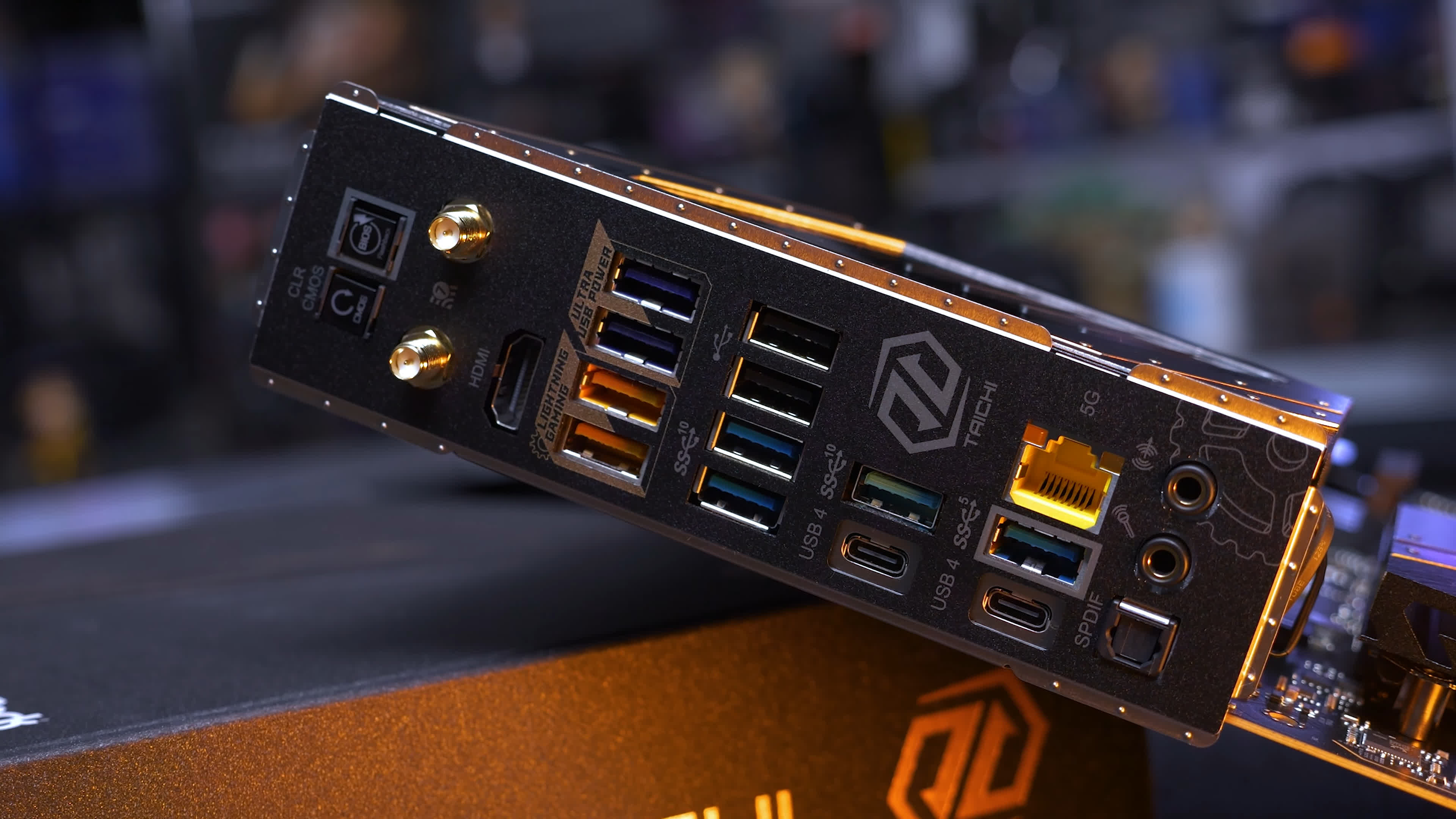
At the I/O panel, you’ll find a dozen USB ports, although two are USB 2.0, and three are USB 3.2 Gen 1. While it’s not the most extensive USB configuration, there are still five USB 3.2 Gen 2 ports and two USB4 ports. Additionally, there’s a LAN port, WiFi antenna ports, optical audio out, two audio jacks, a CMOS clear button, and a BIOS flashback button.

Onboard, there are four M.2 slots. The primary slot is PCIe 5.0 connected to the CPU, while the other three are PCIe 4.0. There are also two PCIe 5.0 x16 slots connected to the CPU. When both are in use, they run at x8/x8.

Additional onboard features include power and reset buttons, a digital diagnostic LED display, an easy-release mechanism for the primary PCIe x16 slot, and tool-less access for the primary and secondary M.2 slots. However, screws are required to access the additional M.2 slots.

The VRM is covered by large heatsinks connected with a heat pipe, and despite this, Asrock still included a small active fan. However, we couldn’t hear the fan during testing. The vcore VRM consists of 24 110A power stages, providing enough power for a 64-core Threadripper CPU – definitely overkill for a desktop board.
Asrock X870E Taichi Lite
If the gold highlights aren’t for you, there’s the Taichi Lite, which has a more refined appearance. Other than the toned-down look, the Taichi and Taichi Lite are the exact same motherboard. The “Lite” version will save you $50, with an MSRP of $400, making it an excellent high-end board for the price.

We’d personally opt for this version, as the easy PCIe connector can be sacrificed, especially since key features like the debug LED remain intact.
Gigabyte X870E Aorus Master
The final motherboard in our roundup is the $480 Gigabyte X870E Aorus Master, which is a refined version of the X670E Master. It’s also not the most high-end X870E board from Gigabyte – that will be the Aorus Xtreme AI TOP. It’s a terrible name, with the cringe-worthy “AI TOP” tacked on, but at $800, it’s certainly extreme. For now, we’ll focus on the Aorus Master.

Around the rear I/O, we see a few updates compared to the X670E model, including the addition of a Clear CMOS button and an improved button for the Q-Flash feature. The WiFi antenna connections have also been updated to the new EZ-Plug design.

In terms of USB support, the only significant change is the inclusion of USB4, with two ports. Other than that, you still get four USB 3.2 Gen 2 ports, four USB 3.2 Gen 1 ports, and two USB 2.0 ports. The USB offering here is somewhat underwhelming, especially when compared to more affordable models like MSI’s X870E Carbon WiFi, which easily surpasses the Aorus Master in this area.

The onboard features are solid. You get both a digital and LED debug, a power button, quick release for the primary PCIe x16 slot, and tool-free access to the M.2 slots. However, the swivel latches are slightly more cumbersome compared to the push-button approach used by MSI. That said, reattaching the heatsinks is quick and easy, so the removal process, while a bit trickier, is still very manageable.
You’re also getting a real finned heatsink over the VRM, and for vcore power, we have sixteen 110A power stages, which is similar to the previous model’s sixteen 105A power stages – still extreme overkill.

There are three PCIe x16 expansion slots in total. The primary is wired for PCIe 5.0 x16 bandwidth, while the second supports PCIe 4.0 x4, and the third is PCIe 3.0 x4. There are four M.2 slots, three of which support PCIe 5.0 devices, with the fourth limited to PCIe 4.0. Overall, it’s a good-looking board, and now it’s time to see how it performs, along with the other boards we’ve reviewed.
Benchmarks
For testing, we’re using the Antec Flux Pro mid-tower case. To record temperatures, we use a digital thermometer with K-Type thermocouples, and we’ll be reporting the peak PCB temperature. We’re not reporting Delta T over Ambient; instead, we maintain a consistent room temperature of 21 degrees Celsius, ensuring stable ambient conditions with a thermocouple positioned next to the test system.

For the stress test, we’re using the Ryzen 9 9950X and running Cinebench 2024, which was looped for an hour. After that, we report the maximum PCB temperature, again recorded using K-Type thermocouples. Now, let’s get into the results…
VRM Temps
As expected, all four boards ran very cool, with all models staying well under 70°C. The best performer was the Asrock X870E Taichi, where we found a peak hot spot temperature of 52°C for both the standard and Lite models.

Additionally, Asrock consumed the least amount of power on the 12V rails – 5% less than Asus and 8% less than MSI – though overall performance deviated by no more than 1%.
Surprisingly, the Aorus Master ran the hottest, at what is still a cool 62°C. Despite this, with a score of 2,289 points, it was the fastest board, though by a very slim margin. In short, all boards passed this test with ease, and VRM thermals are not a concern for any of them, as expected going into this testing.
Chipset Temps
Here’s a quick look at the peak chipset temperatures reported by each board after our hour-long stress test. Temperatures ranged between 52°C and 57°C, with only a small variance. All temperatures were well within safe limits.

EXPO Memory Support
Now let’s take a look at memory overclocking support. For this test, we used G.Skill’s Trident Z5 Neo DDR5-8000 CL38 kit. Our goal was to see if simply loading the EXPO profile would allow the system to run as it should, achieving a stable DDR5-8000 configuration. By “stable,” we mean a one-hour pass of Prime95 Large FFTs – not the most rigorous validation, but given that it takes an entire day to test just one motherboard, we couldn’t devote more time.
| DDR5-8000 EXPO G.Skill F5-8000J3848H16GX2-TZ5RK | ||
|
DDR5-8000 |
DDR5 Max Frequency |
|
| Gigabyte X870E Aorus Master | Pass | 8200 |
| Asrock X870E Taichi/Taichi Lite | Fail Boot | 7400 |
| Asus ROG Crosshair X870E Hero | Pass | 8300 |
| MSI MPG X870E Carbon WiFi | Pass | 8100 |
Here’s what we found: all the boards passed except for the Asrock Taichi models, which both failed to POST with the 8000 EXPO profile loaded. It’s worth noting that all boards were running the latest BIOS revisions available at the time of testing, based on AGESA 1.2.0.2, and Asrock had no further updates for us.
Anyway the findings are as follows, all the boards passed with the exception of the Asrock Taichi’s which both failed to even POST with the 8000 EXPO profile loaded. Now I should note all boards were running the latest BIOS revisions available at the time of testing which were based on AGESA 1.2.0.2, and Asrock had no further updates for us.
Asrock has validated these boards for speeds over 8000, so it’s likely a compatibility issue with our RAM kit, which they can address with a future BIOS update, or something else is at play. We’re not saying DDR5-8000 is impossible on the X870E Taichi; rather, with the kit we tested, it didn’t work. We could get it to POST by manually setting the memory speed to 7800, but it failed the Prime95 test, forcing us to drop down to DDR5-7400 for a pass.

For maximum frequency testing, we left the voltage at 1.4V and manually locked in all primary, secondary, and tertiary memory timings at the EXPO default values. We then raised the memory frequency and ran our one-hour stress test. If the system crashed within the hour, we reduced the frequency; if it passed, we increased it until it crashed.
This testing resulted in a maximum stable memory speed of 8200 on the Gigabyte boards, 8100 for MSI, and an impressive 8300 for Asus. Keep in mind that this data is based on a sample size of one for everything – the CPU, memory kit, and motherboard. But using the hardware we have, these are the frequencies we were able to validate.
ECC Memory Support
Another memory-related test is Error Correction Code (ECC) memory support, which several of you have asked us to look into when testing motherboards – on platforms that support ECC, of course. With AM5, ECC is supported, but it’s an optional feature, and we found that some boards support it while others do not.
| ECC Memory Support Micron MTC10C1084S1EC56BD1R | ||
|
Memory Error Correction Support |
Max Stable Frequency 1 Hour Prime95 |
|
| Gigabyte X870E Aorus Master | Multi-bit ECC | 6400 |
| Asrock X870E Taichi/Taichi Lite | Multi-bit ECC | 6400 |
| Asus ROG Crosshair X870E Hero | None | 6400 |
| MSI MPG X870E Carbon WiFi | POST Fail | n/a |
Both the Gigabyte and Asrock boards worked correctly with ECC enabled, and we were able to overclock the 5600 memory to 6400 using the stock timings and voltage. The Asus board ran with ECC memory, passing the Power-On Self Test (POST), and we could overclock the memory to 6400, but ECC was not enabled.
On the MSI board, it wouldn’t even POST using ECC memory. We tried just one stick and different DIMMs, but with the current BIOS, this memory kit isn’t supported. We reached out to MSI, and they responded, “MSI does not test or validate our consumer range of motherboards with ECC Memory.” So, in short, if you want ECC memory support on an AM5 desktop motherboard, don’t buy an MSI board.
Boot Times
Another frequently requested test is boot times. While we don’t consider boot times critical, as long as they’re reasonable, we know many of you care, so here’s the data. The slowest boards took 23 seconds from power-on to the Windows 11 desktop. All four Windows 11 installs were fresh, with minimal software installed for testing. Everything was removed from startup, so this is essentially a clean install with little to no bloat.

MSI, Asus, and Asrock were all around the 22-23 second mark, but Gigabyte managed it in 17 seconds. These figures are based on a three-boot average, so Gigabyte wins here, saving you 5-6 seconds each time you power on your PC, for whatever that’s worth.
USB Performance
Now let’s look at rear I/O USB performance to ensure everything is functioning as expected. For this test, we used the new Ugreen USB4 M.2 NVMe SSD enclosure with a PCIe 5.0 SSD. This enclosure supports the full 40 Gbps transfer speed, and with the Crucial T700 1TB SSD, we should be able to max it out, at least when reading from the external SSD.
We created a RAM drive for this test and copied a large file from the external USB4 drive to the RAM drive. Using custom software, we recorded the exact transfer time and sustained transfer speed.
We’ll show a visual of the rear I/O, highlighting each port tested along with its transfer speed, based on a three-run average. Note that some ports are grouped as they performed within a few megabytes of each other.
Asrock USB

The Asrock Taichi models include three USB 3.2 Gen 1 ports, limited to around 430 MB/s. Unfortunately, there are also two USB 2.0 ports, which are obviously very slow at 40 MB/s. The five USB 3.2 Gen 2 ports mostly performed well, but one capped out at just under 950 MB/s, though this was repeatable. Finally, the USB4 ports maxed out at 4 GB/s. While theoretically, they could be faster, 4 GB/s was the limit in our configuration, which was consistent across all four boards.
Asus USB

Asus eliminates USB 2.0 on the rear I/O, which is nice to see, and even does away with USB 3.2 Gen 1, making USB 3.2 Gen 2 the slowest interface. Again, we found some Gen 2 ports capped at 950 MB/s, while others exceeded 1 GB/s – not a huge difference, but worth noting. The USB4 ports, once again, maxed out at 4 GB/s.
Gigabyte USB

Gigabyte, like Asrock, offers a range of USB standards on the rear I/O, including USB 2.0, USB 3.2 Gen 1, Gen 2, and USB4. While it’s nice to have a dozen ports to choose from, it’s frustrating to see such slow speeds on some ports, especially on an expensive motherboard.
MSI USB

Finally, MSI offers a configuration similar to Asus, with all ports capable of over 900 MB/s. With 13 ports in total, that’s impressive. We observed an 8% variance in performance across the USB 3.2 Gen 2 ports – some were faster than others – but overall, this is a solid setup.
Audio Quality
We can’t recall the last time we actually used onboard audio, but this is one aspect of the motherboard that some of you wanted tested, so here’s the data. We’re not going to get into the nitty gritty, but if you’re interested, we’re providing the data as an experiment and might continue to do so in the future.


For this test, we used Rightmark Audio Analyzer software, which requires connecting the Line Out to the Line In using a short, high-quality 3.5mm to 3.5mm jack. The OS speaker was set to 100%, and the Line In was adjusted until the software indicated acceptable levels.


The test evaluates several factors, including noise levels, dynamic range, harmonic distortion, and stereo crosstalk. All the boards performed quite well, though the standout was the Asus Crosshair Hero.
What We Learned
So there you have it, our first look at AMD’s latest X870E motherboards. If you’re wondering why we didn’t include any gaming benchmarks comparing X870E and X670E, it’s because there’s no performance difference between the two – they’re essentially the same in that regard.
AMD might push features like DDR5-8000 support, but this isn’t new. Many decent 600-series boards already support DDR5-8000, and it’s not worth the cost since performance is similar to DDR5-6000. So, we wouldn’t recommend spending extra on expensive DDR5-8000 memory.

The only real advantage of the 800-series boards is the mandatory USB4 support, though even some 600-series boards already feature USB4. For instance, the Asrock B650E Taichi Lite includes a single USB4 port and costs $240, while the X670E Taichi offers two USB4 ports for $380.
That said, if you were in the market for a high-end X670E board, these new X870E models should be of interest. Take the MSI MPG Carbon WiFi, for example. The X670E version currently costs $420, which suggests the X870E version could come with nearly a 20% premium, assuming the $500 MSRP is accurate.

The X870E model is significantly better, though. Not only are you getting more USB ports on the rear I/O, but you’re also getting many more high-speed ports – thirteen at 10 Gbps or better compared to just eight on the X670E model. Additionally, you get USB4, which was completely absent on the previous model. WiFi 6E has been upgraded to WiFi 7, and the wired LAN has been upgraded to 5 Gbit while still retaining the 2.5 Gbit connection.
As for which of these four models – or really five, considering there are two Taichis – is best, it’s hard to say since we haven’t seen final retail pricing, and Asus hasn’t provided an MSRP for the ROG Crosshair X870E Hero. While the Asus board is highly impressive, if it ends up costing $700, then it becomes way less appealing.
In any case, consider this a preview of these high-end X870E motherboards. Hopefully, we’ll have a full breakdown of all X870E boards for you in a future review. Until then, let us know what you think about these new motherboards – are you considering buying an 800-series board?